
Complete your student profile
Build a stronger profile by adding your name, fields of study, education level, graduation year, and academic results.
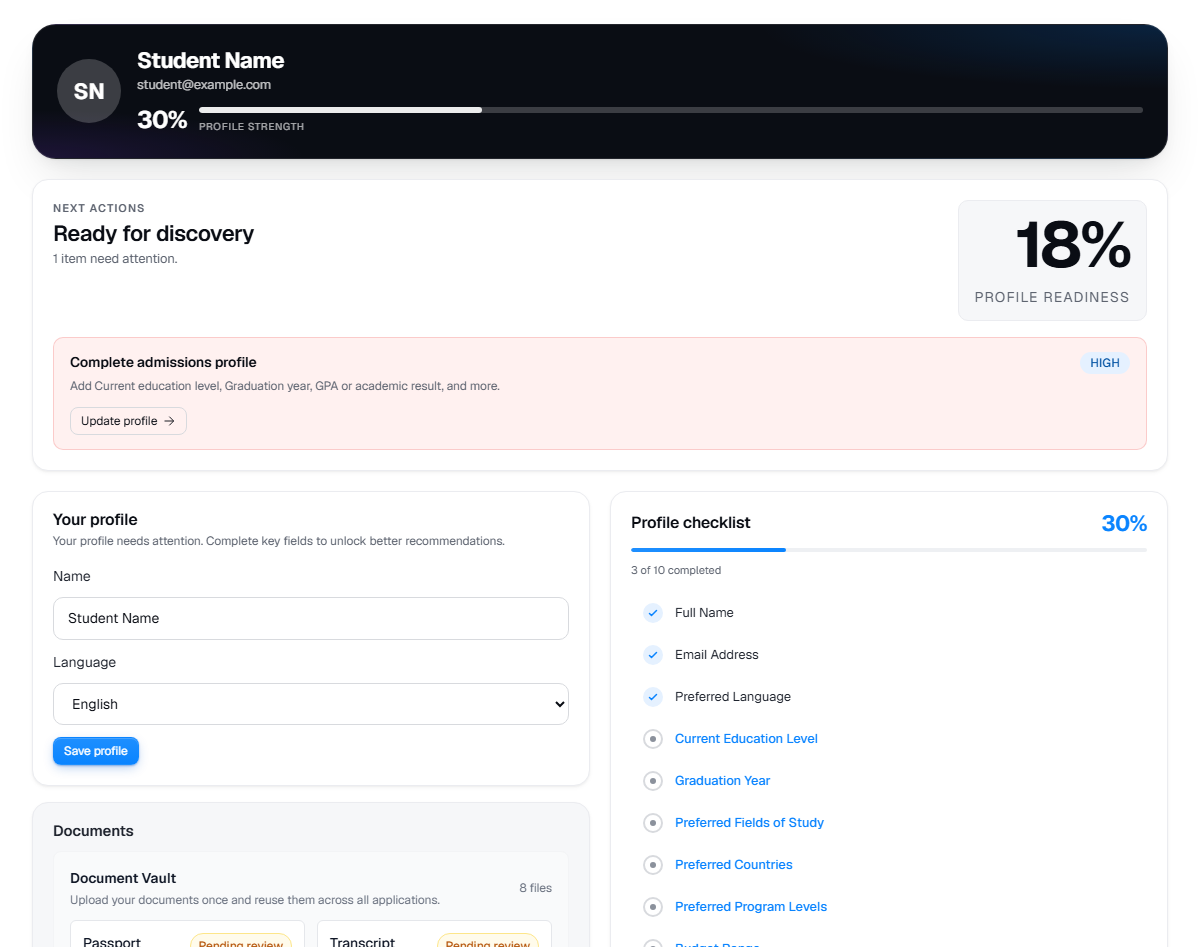
Live product screen
This visual uses the current UniGeni.ai route instead of a mockup.
Capture source
Use the source URL when this screenshot needs to be refreshed after a UI release.
Follow the workflow
Open Dashboard > Profile
The profile page shows a completion percentage and a checklist of missing fields. Choose any incomplete field to jump to the matching section.
Open profileConfirm identity and language
Add your full name and preferred language. Keep your email accurate because application and counsellor updates rely on it.
Add academic details
Enter current education, graduation year, and GPA when available. These fields influence recommendations and eligibility results.
Add fields of study
Select your fields of study so recommendations and search results are easier to compare.
Questions
Why does profile strength matter?
Profile strength helps UniGeni.ai identify better programme matches and reduces missing information during applications.
Can I update my preferences later?
Yes. You can edit profile fields and rerun search or eligibility checks after your preferences change.
Does UniGeni decide admission?
No. UniGeni.ai helps organise your application and estimate fit. The university makes the final admission decision.
Was this guide useful?
Related guides
Upload documents
Prepare and upload transcripts, passport scans, English certificates, payment receipts, and application-specific requirement files.
Check eligibility
Use the eligibility checker to score programmes against your academic profile, language evidence, budget, and target level before applying.
Getting started with UniGeni.ai
Create your account, finish onboarding, and understand the student journey from profile setup to submitted applications.